
Wi-Fi Access Point Calculator
How Many Wi-Fi Access Points Do I Need?
Get a fast, free estimate of access points, PoE and switch ports for your building. It's based on the same rules of thumb our Cisco wireless engineers use for budgeting.
Your estimate
A budgetary estimate based on common design rules of thumb, not a substitute for a survey. Walls, layout and interference all change the final count.
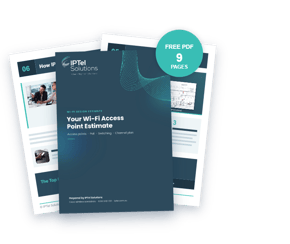
Free 9-Page PDF Report
Get Your Full Wi-Fi AP Estimate Report:
Everything in your estimate, plus the detail you need to set a budget, brief your cabler or compare quotes. Written by our Cisco wireless engineers and emailed to you in under a minute.
- Access points floor by floor, with the Cisco Meraki models we suggest for cloud management, and why
- An indicative hardware list: APs, licences, PoE switch ports and mounting kits
- Advice for your site: your building type plus each area, such as car parks, outdoor areas and warehouses
- An Australian channel plan for 2.4, 5 and 6 GHz
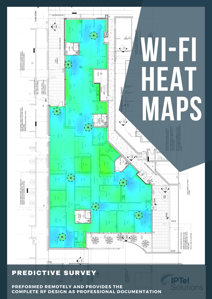
- A preview of a predictive RF design: design report, coverage heatmaps and AP markup
- Clear next steps, with a free, no-obligation quote when you are ready
Just your work email. Your report is yours to keep and share with your team.
Preview mode: no HubSpot form is attached to this module yet.

Free Wi-Fi AP Estimator
Your Wi-Fi Design Estimate:
Access Points by Floor
These figures are an estimate based on the information supplied. A predictive survey is needed to confirm the AP quantity for each floor. Learn about our Wi-Fi surveys and RF design.
Recommended Hardware
Request a Hardware Quote →Switching and Power
PoE draw depends on the access point model selected, so this is an estimate only. Typical access points draw between 30 W and 60 W each.
Channel Plan (Australia)
Things to Check for Your Site
Turn This Estimate Into a Real Design
Send us your floor plans and our wireless engineers will turn this estimate into a real design, with a free, no-obligation quote for the hardware and installation.
Free Wi-Fi access point estimator by IPTel Solutions, Cisco wireless specialists
Already Have Wi-Fi That Isn't Performing?
More access points won't always fix it. Dropouts, poor roaming and slow speeds usually come from RF, client or configuration problems.
Wi-Fi Assurance Review
We test your whole wireless environment, covering RF conditions, client roaming and controller configuration, to find out why it's underperforming. We typically find 6–8 root-cause issues per site.
- Wi-Fi diagnostic survey: onsite RF measurements with heatmaps across six key metrics
- End-client debug: real roaming events captured from your own devices
- Configuration review: your settings checked against Cisco and industry best practice
You get a plain-English report with a traffic-light summary and prioritised fixes. We can also stage the remediation, with change control, rollback plans and user acceptance testing.

RF Tuning: Getting the Most From Your Wi-Fi
How channel and transmit power tuning cuts interference and improves roaming, often without adding a single access point.